VISUAL PROJECT PLANNING FOR REAL WORK
One deadline moves. Your whole plan shouldn’t fall apart.
Plan tasks, see what changes, and keep everyone clear on what happens next. One visual workspace for freelancers, consultants, and small teams.
No credit card required · Free Starter plan

See it working
Move one date. See exactly what changes.
This is the real PlanLine timeline. Follow the highlight to see how a single date change moves only the work that genuinely depends on it.
Three connected tasks on the real PlanLine timeline. Design waits on Kickoff, and Build has a planned gap after Design.
The highlight runs over a real PlanLine timeline. Nothing in the interface is redrawn or simulated.
Where projects get messy
Three problems every small team knows
PlanLine answers the moments that actually derail project work — without adding process you don’t need.
The client moved the deadline
One date change, instantly understood
A single date change can ripple through a whole plan. PlanLine shows which tasks are genuinely affected — and which are not — so you can respond in minutes instead of rebuilding the schedule by hand.
 Deadline changed · 2 of 3 tasks affected
Nobody knows who’s responsible
Ownership that everyone can see
When responsibility is unclear, work stalls quietly. Use RACI to make it obvious who does the work, who owns the outcome, who gives input, and who simply needs to be kept informed.
 ResponsibleAccountableConsultedInformed
Several projects. Too many moving parts.
Every project, visible at a glance
Structured tasks, a clear timeline, and project-level visibility keep every engagement on track. See what is due, what is at risk, and how each project is progressing — all in one workspace.
 Website redesignBrand rolloutQ4 retainer
Ready to see your project clearly?
Create a free workspace and try PlanLine with one real project.
✓ No credit card required
How PlanLine connects tasks, timelines, and responsibility
Most tools separate the work from the timeline and the people from the task. PlanLine keeps them together, so a change in one place stays visible everywhere it matters.
Tasks with structure
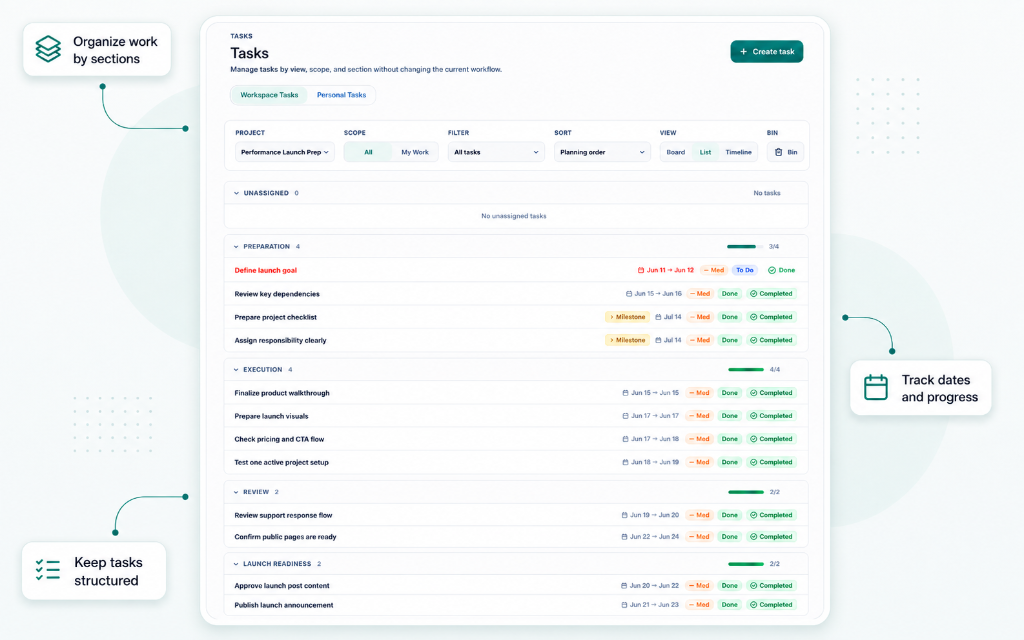
Break work into sections, dates, milestones, and progress — with the project context intact.
A timeline that updates
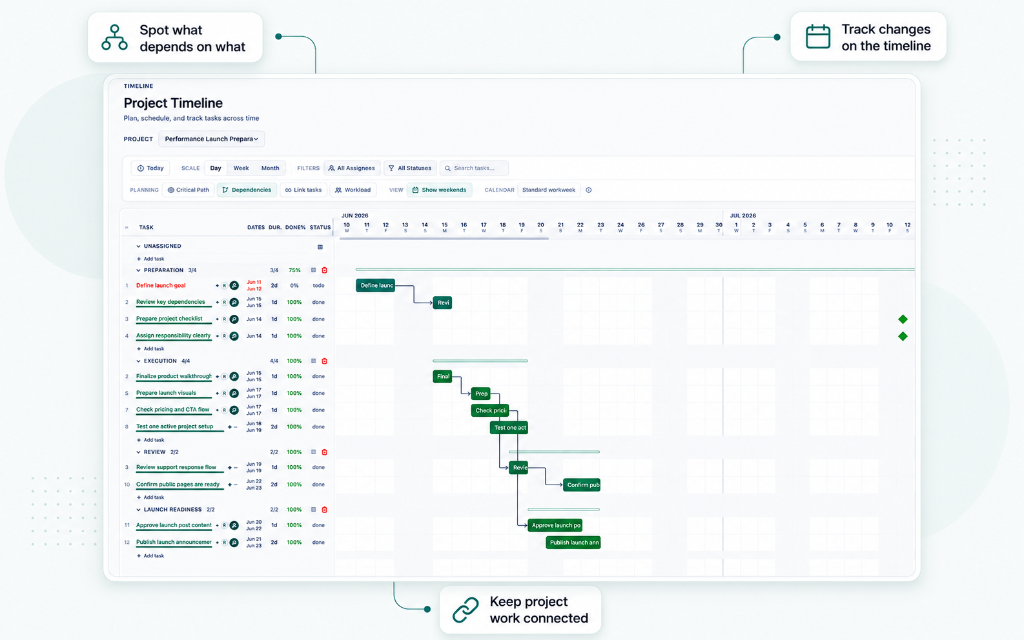
Move a date and see which dependent tasks shift. Gantt bars, dependencies, and milestones in one view.
Responsibility made clear
Use RACI roles so everyone knows who does the work, who owns the outcome, and who needs updates.
Who it’s for
Built for freelancers, consultants, agencies, and small teams
PlanLine is made for people managing real project work — no heavy enterprise setup required.
Freelancers
Run several client projects at once without juggling scattered tools.
PlanLine for freelancers →Consultants
Structure complex engagements and keep stakeholders clear on progress.
PlanLine for consultants →Agencies
Coordinate delivery across clients and keep every project visible.
PlanLine for small agencies →Architects & designers
Plan phases, dependencies, and sign-offs on one clear timeline.
PlanLine for architects & designers →Small teams
Share responsibilities and execution without enterprise overhead.
Operations & small businesses
Track ongoing work with clarity instead of ad-hoc lists.
Inside PlanLine
See how daily work, task structure, and timelines stay connected.
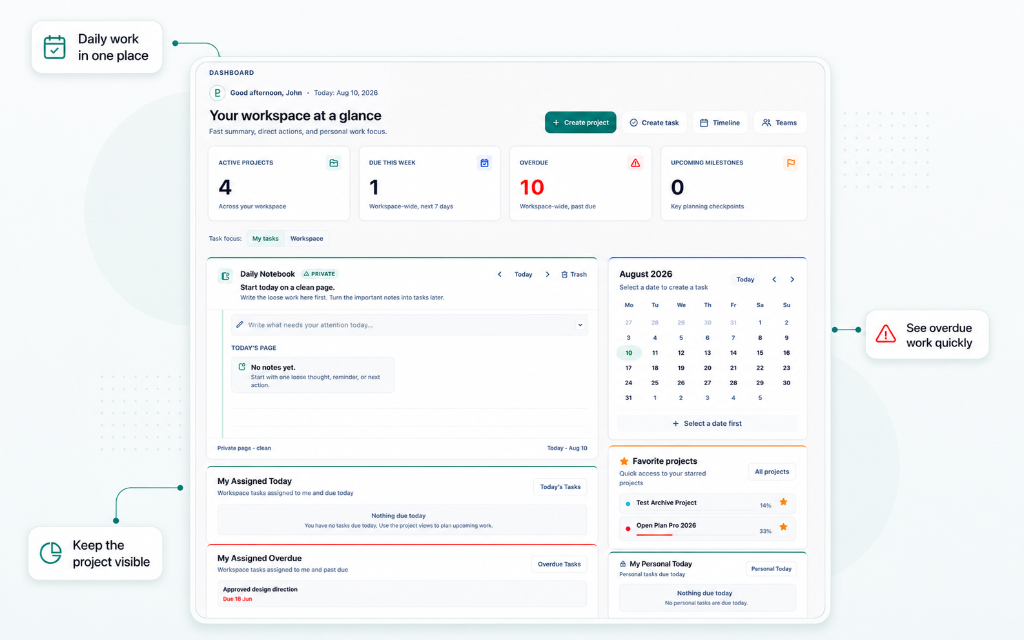
Daily work in one place
See active projects, overdue work, daily notes, calendar focus, and favorite projects from one workspace view.
Tasks with structure
Organize work by sections, dates, status, milestones, and progress without losing the project context.
Timeline and dependencies
Plan work across time, link dependent tasks, and see how connected work moves through the project.
Start planning in minutes
Your first project is only a few clicks away.
Create your account
Sign up free — no credit card required to begin.
Create a project
Give it a name and start shaping the work.
Add your first task
Set a date, link a dependency, and plan on the timeline.
No credit card required · Free Starter plan
Simple, transparent pricing
Start free. Scale when you're ready. No hidden costs.
Early user offer — get 40% off with Founder300.
Questions?
We've got answers about PlanLine and how it works.
What is PlanLine?
PlanLine is project planning software for freelancers, consultants, and small teams. It brings tasks, timelines, dependencies, and responsibility into one clear workspace.
Who is PlanLine built for?
PlanLine is built for freelancers, consultants, small agencies, small businesses, and small teams that need clearer project planning without heavy enterprise software.
Does PlanLine include timelines?
Yes. PlanLine includes a timeline view so teams can see project timing, task duration, progress, and dependencies.
Does PlanLine support responsibility planning?
Yes. PlanLine includes responsibility planning so teams can clarify who is responsible, accountable, consulted, and informed.
Can I start for free?
Yes. PlanLine includes a free Starter plan, so you can create a workspace and try it with one real project.
Is PlanLine only for large teams?
No. PlanLine is designed mainly for freelancers, consultants, and small teams that want clearer project work without adding unnecessary process.
What makes PlanLine different from a task manager?
Most task managers focus on lists. PlanLine helps you structure execution with visual timelines, clear responsibility, and project planning that shows how work connects.
Do I need a credit card to start?
No. You can start with the free Starter plan without a credit card.
Start planning with more clarity
Create your first project and see how tasks, timelines, and responsibility work together.
✓ No credit card required
Listed on software discovery platforms
PlanLine is available on selected directories where teams compare project planning and work-management tools.





Get product updates
Receive occasional PlanLine product updates, feature releases, and launch news.